 Cachard
Know your content caches are working before deployment day.
When 2,500 iPads update at once, a caching Mac that quietly stopped means every one of them pulls gigabytes across your WAN. Cachard watches every content cache at every site, shows what each one is serving, alerts you the moment a site isn't covered, and updates the caches themselves one at a time, never while another cache at the same site is down. It runs on your own server, with nothing to install on the Macs.
All features in the trial · No agent on the Macs · Up and running in about ten minutes
Click through the console
These are real screens from Cachard's demo mode, with a fictional school district and simulated Macs. Choose a stop, then tap the green markers.
./run.sh --demothen open localhost:8080 (password demo).Everything a caching fleet needs, in one place
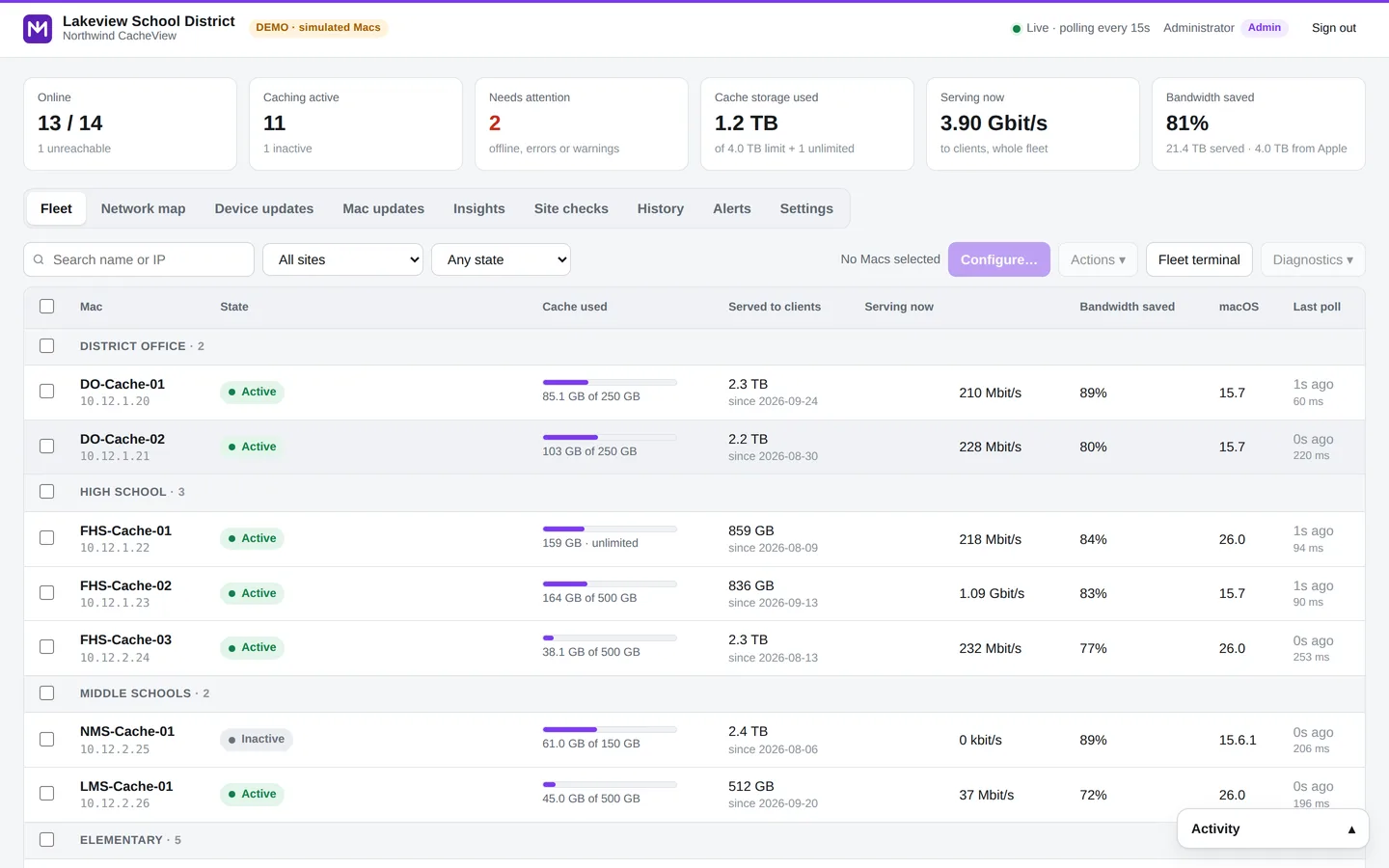
Live fleet view
Online, caching, cache used, served to devices, serving now and bandwidth saved for every Mac, refreshed every 15 seconds.
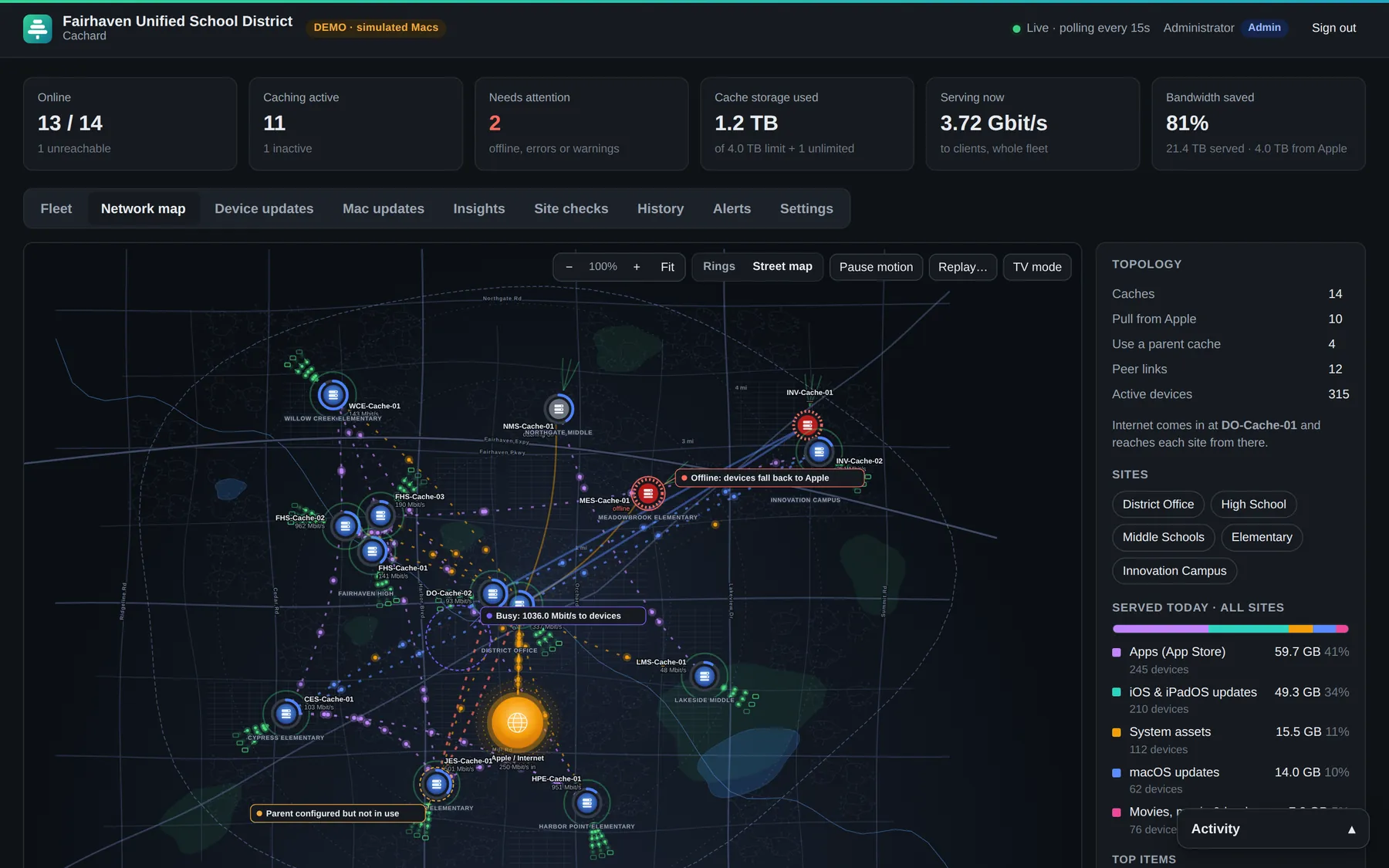
Network map & TV mode
Traffic flows from Apple to parent caches, site caches and individual devices, as rings or on a street map of your area. Put it on the NOC wall.
Configure many Macs at once
Cache size, parents, peers, listen and public IP ranges. Preview every change, apply in parallel, and Cachard re-reads each Mac to verify it stuck.
Device update tracking
What's being downloaded, cache hit rates, iOS and macOS rollout per site, and devices stuck re-downloading the same update.
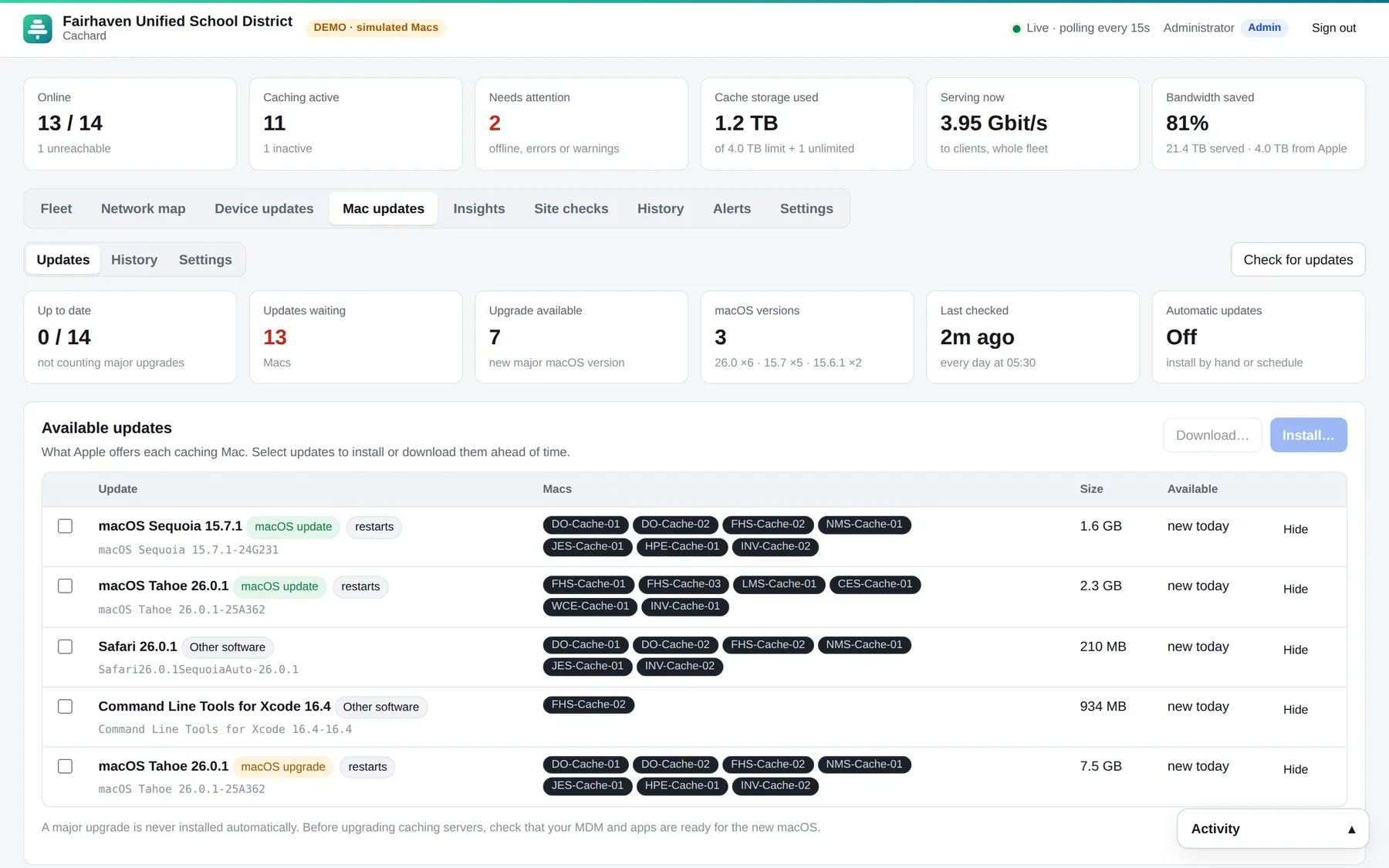
macOS updates for the caches
Scan, schedule and roll out updates a few Macs at a time, with a site safeguard that won't update a cache while another at the same site is down.
AI insights (optional)
With your own Claude API key, Claude reads the whole fleet and explains what's happening in plain English, with prioritised fixes and a place to ask questions.
Site checks
Are devices at each site actually finding their cache? Internet speed per site. Mac health, disk and power settings.
History & replay
Daily totals kept for 13 months, a weekly report by email, and a replay of any day's traffic on the map.
Alerts that respect your day
Email and Microsoft Teams alerts for offline caches, lost parents and low disk, with quiet hours and all-clear messages.
Standard settings & drift
Define how every cache, or every cache at one site, should be set up. Cachard flags drift and MDM profiles that override local settings.
Accounts, SSO, two-step
Viewer, technician, administrator and platform administrator roles, email invitations, Microsoft Entra ID or Google sign-in, and required two-step sign-in.
Remote terminal (optional)
A shell on any Mac in the browser, or one command across many Macs. Off by default, platform administrators only, every session recorded, and it can be locked off at the server.
Your caches, on your streets
Set each site's address and Cachard builds a street map of your area from OpenStreetMap once, then keeps it on the server. Wall displays and locked-down networks never load map tiles.
- Follow the bytes. Amber from Apple, blue between caches, green to devices, with the busiest links labeled.
- Zoom into a site to see every iPad, iPhone, Mac and Apple TV it served, and what each one downloaded.
- Problems show where they are. An offline cache pulses red; a parent that's set but unused is drawn dashed.
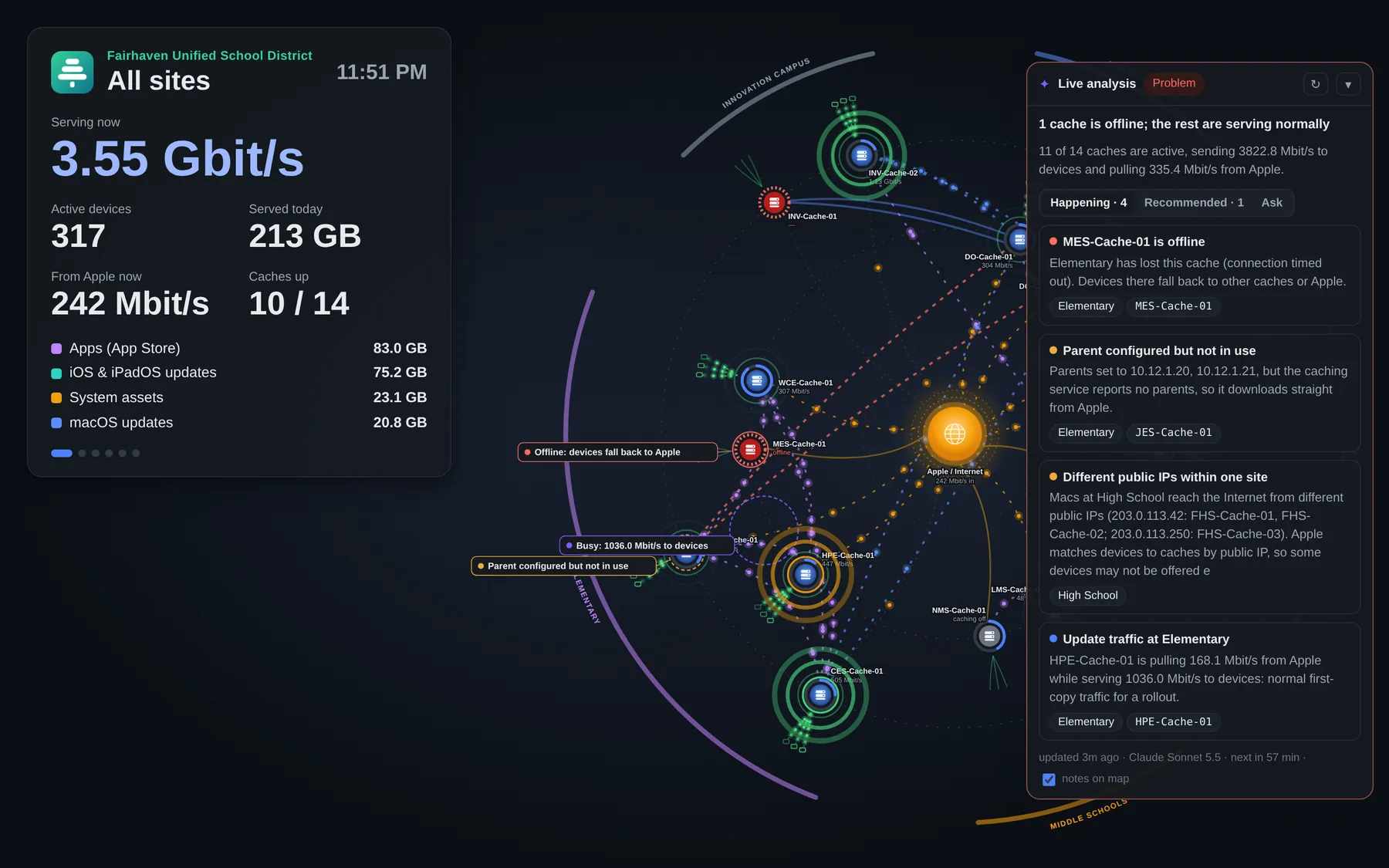
Made for the wall in the NOC
Full-screen and hands-off. It tours each site, shows what's being served right now, and keeps the live analysis on screen. A read-only link works on any display without signing in.
Update the caches without taking a site offline
The caching Macs need macOS updates too. Cachard rolls them out the way an infrastructure admin would, so wherever a site has two or more caches, one of them is always serving.
- Site safeguard
Set the minimum number of caches each site must keep available. Cachard won't update Cache B while Cache A at the same school is down; it waits, then skips with a clear reason. Restarts ask first.
- One site at a time, parents last
A few Macs per batch, never two from the same site, with the parent caches that feed others updated last.
- Pilot first, stop on failure
Start with one Mac, stop the rollout if anything fails, and confirm each Mac came back with caching running before moving on.
- Tonight, or every week
Schedule a run for after school, or let Cachard install updates that have been out a few days in a weekly window. Alerts pause for Macs being updated.
From a fresh VM to a watched fleet in about ten minutes
# the one line from your trial email
$ curl -fsSL https://cachard.app/i/your-link | sudo bash
▸ Downloading Cachard 1.3.0 · checksum verified
▸ Checking this server
  ✓ Ubuntu 24.04 LTS · 4 GB memory · port 8080 is free
▸ Installing the service
  ✓ Service 'cachard' enabled (starts on boot)
▸ Starting
  ✓ Cachard is running

  Open:        http://10.10.0.15:8080/setup
  Setup code:  7F3A-91C2-0B6D
docker compose up -dRun one line
Paste the command from your trial email on the server. It downloads Cachard, verifies the download, installs a hardened service and prints a one-time setup code. Offline bundles work on air-gapped networks.
Follow the wizard
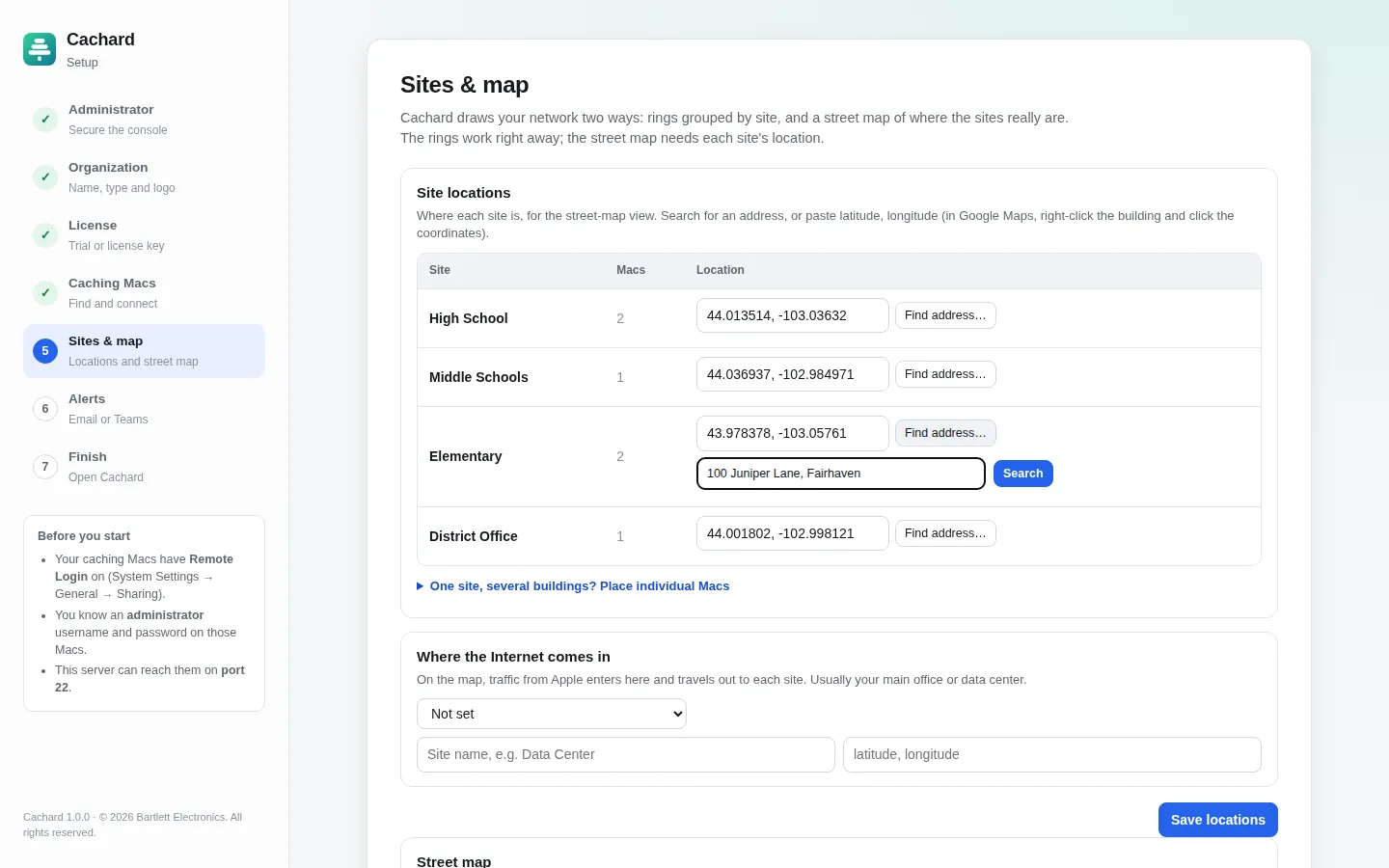
Name your organization, start the trial or paste a license key, then scan your subnets. Cachard finds the Macs with Remote Login on.
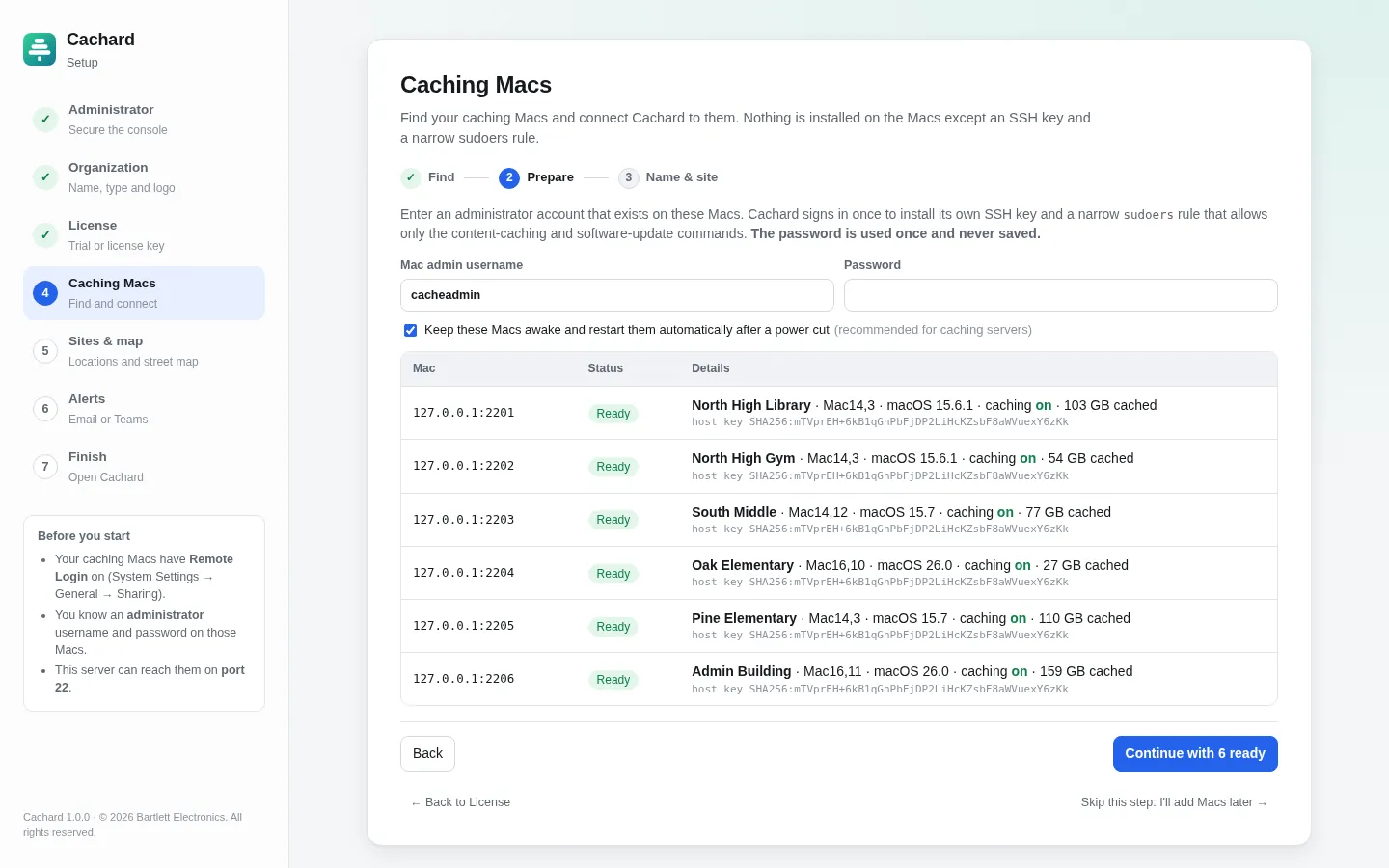
Prepare every Mac at once
Enter a Mac admin password once. Cachard pins each host key, installs its key and a narrow sudoers rule, and confirms each Mac is ready. The password is never stored.
Place your sites and turn on alerts
Search an address for each site, build the street map, and point alerts at Teams or email.
Anywhere hundreds of Apple devices share one Internet connection
K-12 school districts
iPad carts and Mac labs all pulling the same iPadOS update at 8:05 on a Monday.
- One cache per school, a parent at the district office
- Knows the school day: urgent during class, quiet overnight
- Per-school reports for the technology director
Colleges & universities
Residence halls, labs and libraries across a campus, with student devices you don't manage.
- Serve unmanaged devices on campus subnets
- Listen and public IP ranges checked against reality
- Roles for help-desk staff and network engineers
Businesses
Offices, stores or plants with Mac and iPhone fleets and expensive or thin WAN links.
- Keep macOS and app downloads off the WAN
- Works with any MDM, no agent to approve
- SSO, audit log and on-premises data for compliance
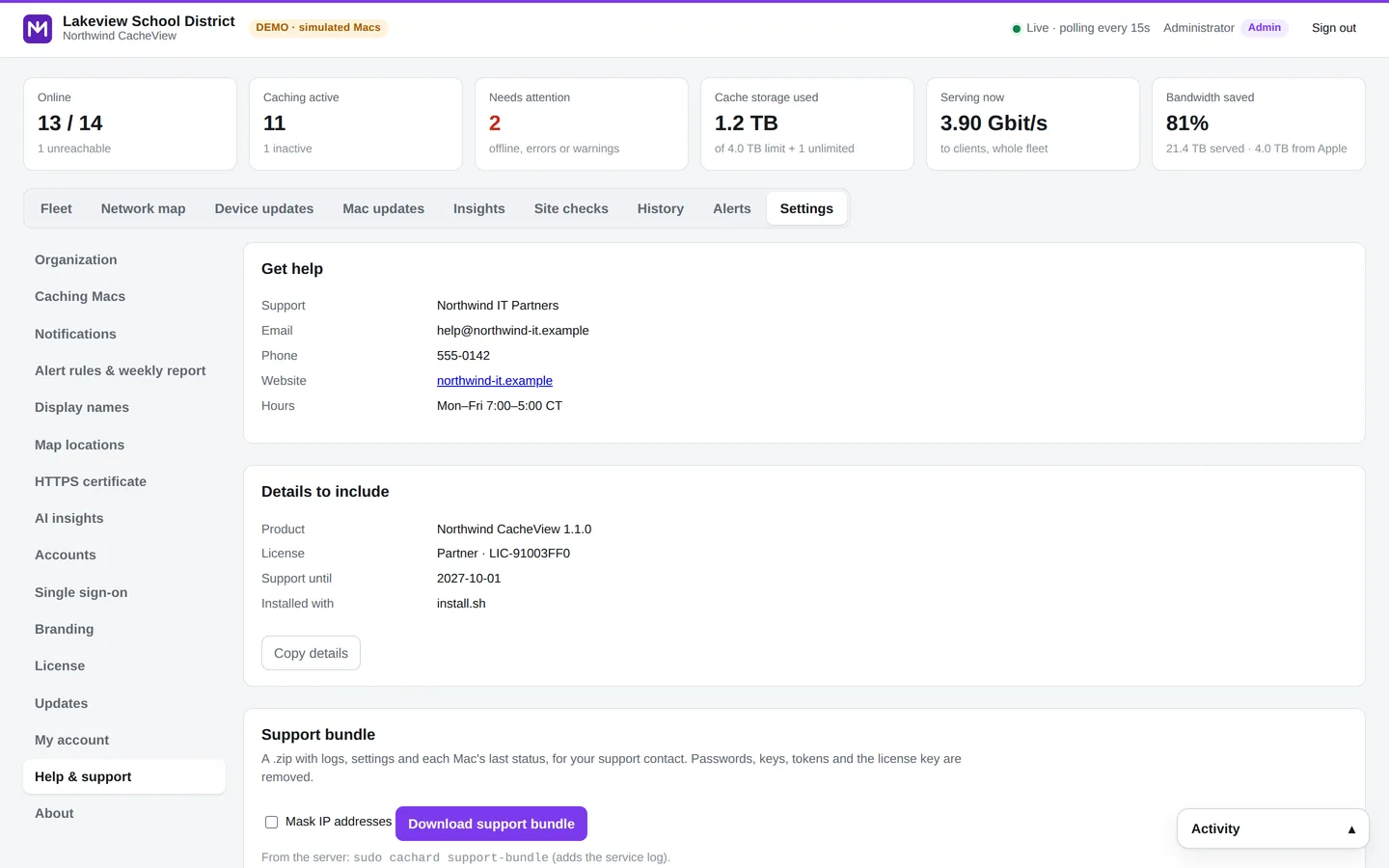
Your name on the console, not ours
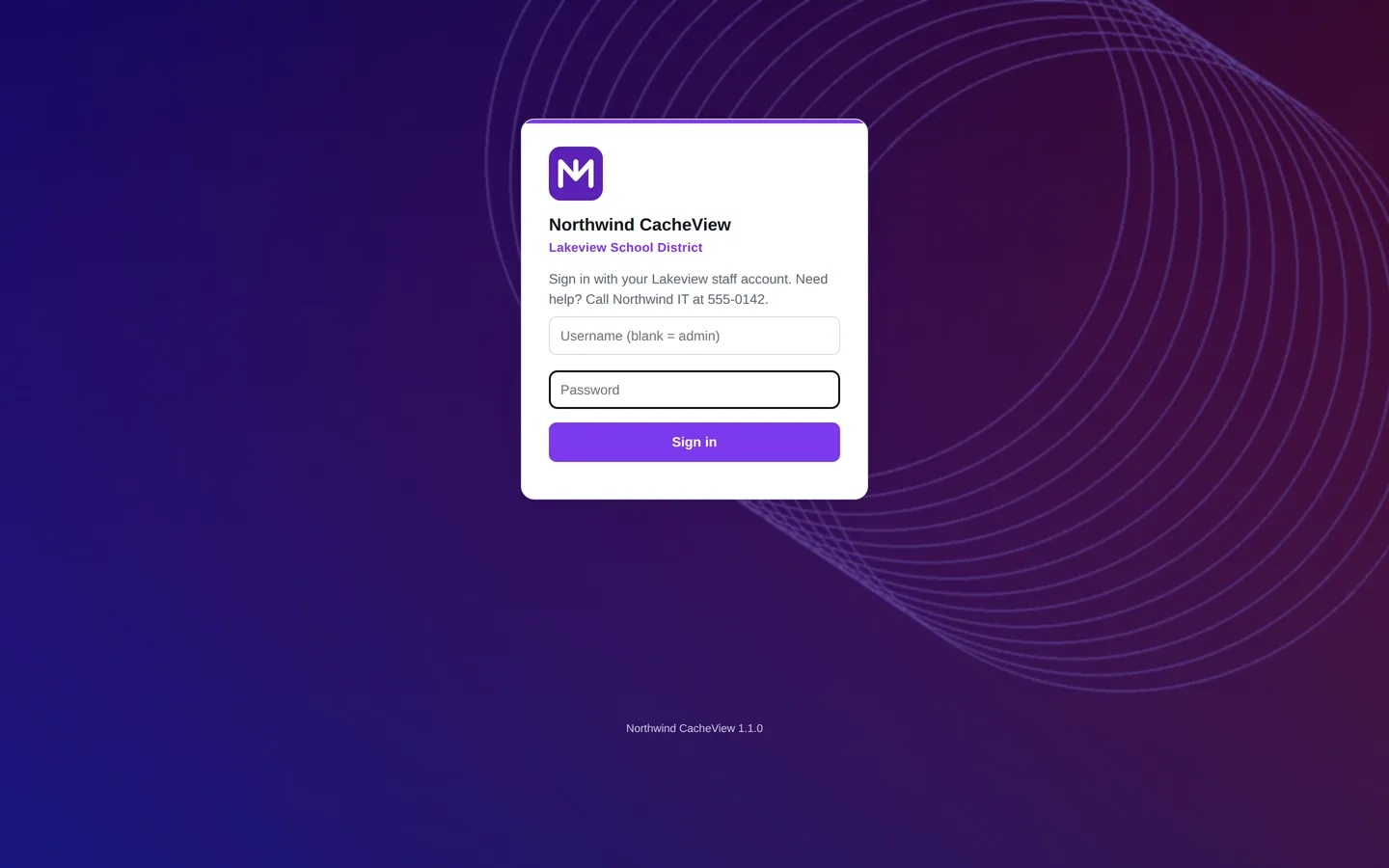
Managed service providers, resellers and central IT teams can present Cachard as their own product. Set it once under Settings → Branding, or ship a branding pack with the installer so the very first setup screen is already yours.
Any accent color stays readable: text shades are adjusted automatically for contrast in light and dark mode. Weekly reports, alerts, two-step sign-in apps and the AI analyst all use your product name. Included with Enterprise and Partner licenses, and you can preview it during the trial.
Shown: “Northwind CacheView”, a fictional reseller brand.
Stays current without a maintenance weekend
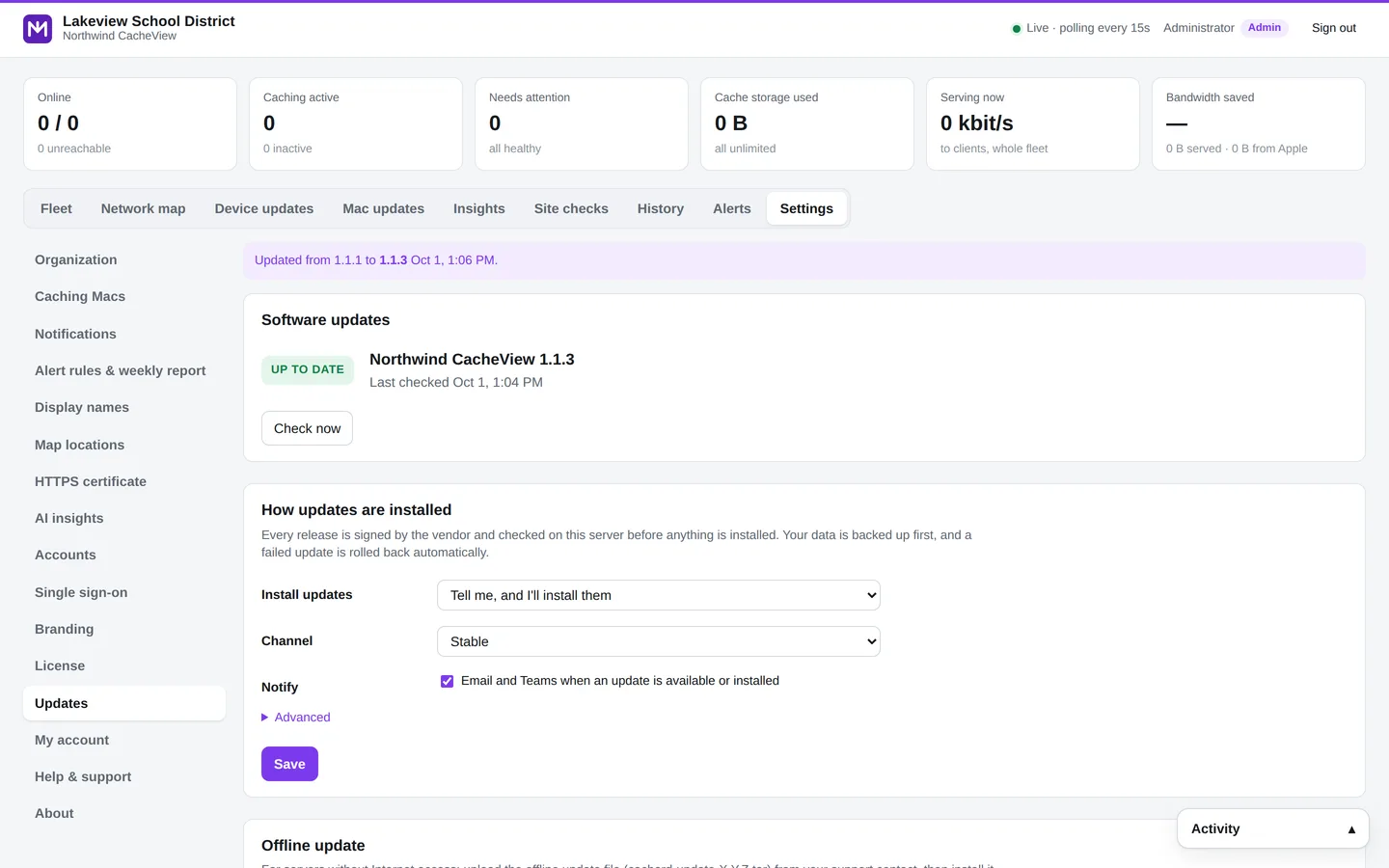
Cachard checks for new versions every few hours. Install with one click, or let it update itself overnight in your maintenance window.
- Signed and verified
Every release is signed and checked on your server before anything is installed.
- Your schedule
Notify only, install patches automatically, or install everything, on the days and hours you choose. Never while the caches are updating macOS.
- Backed up, with automatic rollback
Data is backed up first. If the new version doesn't start, the previous version and data come back on their own.
- Air-gapped too
Offline update files for networks without Internet access, and
cachard updateon the command line. - Built-in support
Help & support in the console, and a one-click support bundle with passwords, keys and secrets removed.
Read exactly what it can do, before you install anything
Cachard can manage infrastructure Macs, so it's built to be inspected. Your cache telemetry never leaves your network, and everything below is spelled out in the Security & Architecture Guide for your security review.
Install with --monitor-only and the console can't change any Mac, for any account, while the Macs themselves allow only read-only status commands. Only root on the server can switch modes.
The browser terminal is off until a platform administrator turns it on, every session is recorded, and --no-terminal locks it off for good.
A dedicated SSH key and a visudo-checked sudoers file that the Mac enforces. It's published in full below.
Viewer, Technician, Administrator and Platform administrator, with Microsoft or Google single sign-on and two-step sign-in.
Self-hosted on Linux or Docker. No vendor cloud and no usage analytics. Update checks send only the version and license ID, and can be turned off.
Cache status and settings, macOS versions, and from the caching logs each device's IP address, type, OS build and what it downloaded. No user names, Apple Accounts or content. Kept 30 days, on your server.
Changes, actions, Mac updates, account and security changes and terminal sessions are recorded with who, when and the exact commands.
Releases are signed, verified on your server by a root-owned updater, backed up first and rolled back automatically if they fail.
The sudoers file Cachard installs
The only commands Cachard's account may run as root on a Mac without a password, in full mode. /etc/sudoers.d/zz-cachard:
# Installed by Cachard. Lets the console's SSH account run only these commands as root.
Cmnd_Alias CACHARD_UTIL   = /usr/bin/AssetCacheManagerUtil
Cmnd_Alias CACHARD_PREFS  = /usr/bin/defaults write /Library/Preferences/com.apple.AssetCache.plist *, /usr/bin/defaults delete /Library/Preferences/com.apple.AssetCache.plist *
Cmnd_Alias CACHARD_REBOOT = /sbin/shutdown -r now
Cmnd_Alias CACHARD_SWU    = /usr/sbin/softwareupdate
Cmnd_Alias CACHARD_SWPREF = /usr/bin/defaults write /Library/Preferences/com.apple.SoftwareUpdate *
cacheadmin ALL=(root) NOPASSWD: CACHARD_UTIL, CACHARD_PREFS, CACHARD_REBOOT, CACHARD_SWU, CACHARD_SWPREF
In monitoring-only mode
Read-only status commands, nothing else:
# Installed by Cachard (monitoring-only). Lets the console's SSH account run only these read-only commands as root.
Cmnd_Alias CACHARD_READ = /usr/bin/AssetCacheManagerUtil -j status, /usr/bin/AssetCacheManagerUtil -j settings, /usr/bin/AssetCacheManagerUtil status, /usr/bin/AssetCacheManagerUtil settings, /usr/bin/AssetCacheManagerUtil canActivate
cacheadmin ALL=(root) NOPASSWD: CACHARD_READ
Priced per caching Mac, not per device
Every plan includes every feature, automatic updates and email support. Start with a 30-day trial; no card needed.
Schools & colleges
- K-12, higher education and nonprofits
- All features, unlimited devices
- Automatic updates and email support
- Purchase orders welcome
Companies
- All features, unlimited devices
- Microsoft and Google single sign-on
- Automatic updates and email support
- Annual invoicing
Large fleets
- White-label branding included
- Volume pricing and multi-year terms
- Guided onboarding and priority support
- Security questionnaire help
MSPs & resellers
- Full white-label: your name, logo and support
- Branding packs for branded installs
- Wholesale per-cache pricing
- Partner support line
Asked by network admins
Do I need to install anything on the Macs?
No agent. The setup wizard installs an SSH key and a sudoers rule that allows only the content-caching and software-update commands. Remote Login must be on. Macs where password sign-in over SSH is disabled can be prepared with a script or your MDM.
What exactly can Cachard do on our Macs?
It signs in over SSH with its own key and runs a fixed list of commands. As root, only the commands in the sudoers file above. With the remote terminal off (the default), the console can't run anything else. The Security & Architecture Guide covers the full detail, including how the key is stored and what the account can do without root.
Can we start with monitoring only?
Yes. Install with sudo ./install.sh --monitor-only (or CACHARD_MODE=monitor with Docker). Cachard shows everything but can't change any Mac, and the Macs get a read-only sudoers rule. Switch to full management later with sudo cachard mode full.
Does it replace our MDM?
No, it works next to Jamf, Mosyle, Kandji, Intune or any other MDM. When an MDM profile manages a caching setting, Cachard shows it and warns before you change it locally.
Which macOS versions are supported?
Any Mac that runs Apple's content caching and the AssetCacheManagerUtil tool, on Apple silicon or Intel. The console reads each Mac's version and adapts.
What does the server need?
Ubuntu 22.04 or 24.04, or Debian 12, on a small VM (1 vCPU, 1 GB RAM, 2 GB disk); a Mac with macOS 12 or newer, such as a spare Mac mini or one of your caching Macs; or Docker. It needs to reach the Macs on port 22. Internet access is only needed to install, to build the street map once, and for automatic updates, optional AI insights and Teams alerts. Air-gapped servers can update from offline files.
What happens when the trial or license ends?
Cachard keeps monitoring, mapping and alerting. It stops making changes to the Macs until a license key is entered, so your caches are never left unwatched.
Is AI insights required, and what does it send?
It's optional and off by default. With your own Claude API key, Cachard sends an aggregate snapshot (Mac names, sites, states, settings, traffic totals and findings) and shows you exactly what's sent. Device IP addresses and identities, passwords and keys are never sent.
Can we put our own name and logo on it?
Yes. Enterprise and Partner licenses include white-label branding: product name, logos, icon, accent color, sign-in page, support contact, renewal link and email sender, with the option to hide “Powered by Cachard”. Every plan can show your organization's name and logo next to the product name.
How do updates work?
Cachard checks a signed release feed once a day. You choose to be notified, to install patches automatically, or to install everything, within a maintenance window. Each update backs up your data first and rolls back on its own if the new version doesn't start. Updates are included while your license's support term is active.
Can we try it without touching our network?
Yes. ./run.sh --demo runs a fictional district with 14 simulated Macs on any machine with Python.
Try Cachard on your own caches
Tell us a little about your network and we'll email you a one-line install command for your server right away. Need a quote or want to resell Cachard? Choose that below and we'll reply within one business day. Prefer email? Write to sales@cachard.app.